03 December 2020

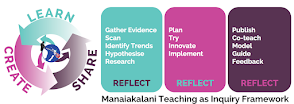
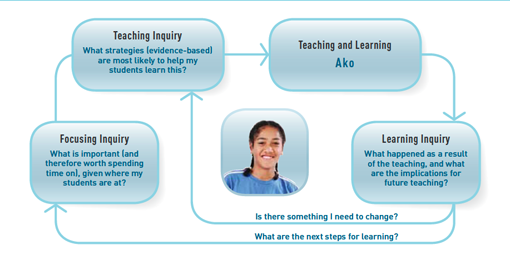
Teaching As Inquiry 2020


2020 has been such an "atypical" year, and Senior Management at Hornby High have stated that there is no obligation to complete our Teaching As Inquiries (TAIs) this year, and we can carry it over to 2021.

Image result for teaching as Inquiry nzc

However, I have already done the work as it largely relates to the work I did in and around the DFI course I completed in Term 3, so I have completed the documentation, which can be found here.

15 November 2020

From Hornby to Hogwarts

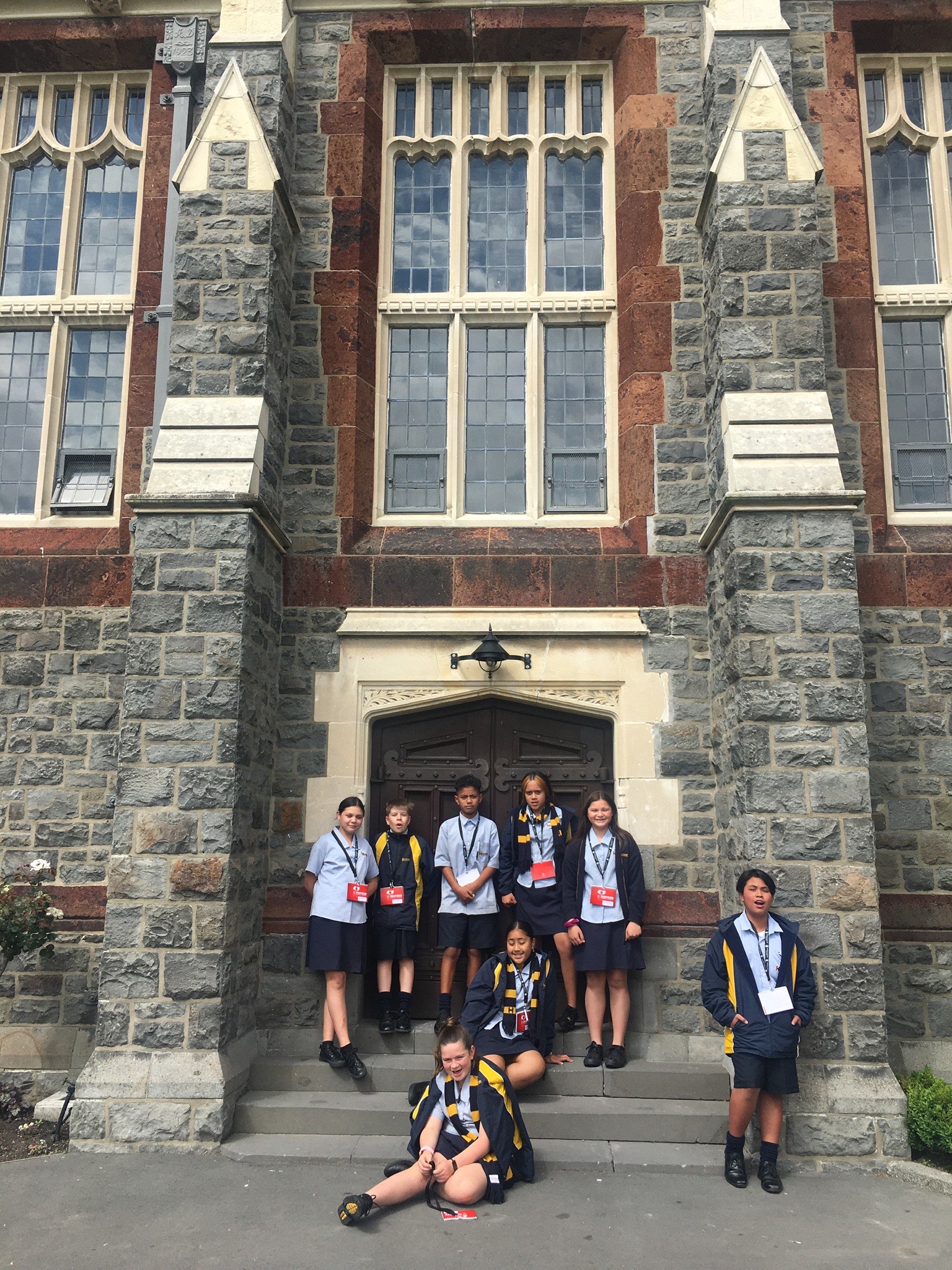
Last week I had the pleasure of taking a small group of Year 7 students to the "Be Inspired" workshop hosted by Christ's College. This was the second year that I've taken students to this annual event and there are a few observations I feel are worth noting about our kids.
  • Hornby kids are as happy to believe in make-believe as any kids. In the van on the way to Christ's College I told the students that last year we were lucky enough to see a group of "College" kids practicing for a game of quidditch. There was momentary silence in the van until one brave soul asked "For real, Mister?", to which I replied (deadpan) "For real. I can show you the photo when we get back to school". No-one has called me on it so far, so it's officially true.
Hornby Year 7 Students at Christ's College
  • Despite their bravado, Hornby kids lack self confidence. A few of the kids who came with me were brimming with self confidence on the way to the event - after all, I had just told them that they were selected by their teachers as being our future leaders. However when surrounded by their peers from the "posh" schools (their words not mine) most of them crumbled. Seems it's fine to compete against the "posh schools" on the sports field, but something again to be accepted as their equals in a non-competitive environment.
  • Respect is a value well practiced by Hornby students. Our students showed our core value of respect to their peers and the presenters at the workshop, and were a tribute to the school. I was very proud to see their acceptance of students who were different to them. They are also supportive of each other in a way you normally only see amongst siblings.
  • Hornby kids are inquisitive about the world beyond theirs. Despite the vast differences between their reality and that of the students at Christ's College, they were quick to ask me and Christ's College students about the world of relative privilege of private school students. There was no jealousy, no judgement, and no awkwardness. Just questions about unfamiliar realities so that they could expand their understanding of a world that was beginning to expand for them.
  • Hornby kids place too much value on money. Some of the students asked me if I would like to teach at Christ's College. I told them that there were some really good things about the school, including small class sizes and great facilities. However, I told them, I would miss working with kids like Hornby kids. "What if they offered to pay you more to work there?" they asked as a test. "I wouldn't change schools even if they offered to pay me double" I replied. "For real?" one of my own Wānanga class asked. "For real" I truthfully replied. I guess it's easy to place a high value on the things you don't have. We need to work on helping our kids to have a more balanced view of the value of money against other things of value.
    Hornby kids taking charge in a challenge.
  • Hornby kids love celebrities as much as anyone.  The students found out from a Christ's College teacher that our Principal Robin Sutton used to teach at Christ's College. They asked me if this was true, and when I confirmed this news it seemed to elevate Mr Sutton to celebrity status with the students. To bring Robin back to mortal status I told them "Yes, but he worked for Hornby before that, so he was really only on loan". "Oh, fair enough then" one student replied.
  • We take some things for granted. At Hornby we start meetings with karakia and we open important events with presentations by our kapa haka group. We often (although not often enough) bless food with karakia kai. We celebrate bi-culturalism. Christ's College could learn much from Hornby High School.

All in all I enjoyed the "Be Inspired" workshop. I came away inspired enough to write this post.

24 September 2020

DFI Course - Epilogue

Exam Results

This is just a quick note to say that 8 days after taking the Google Certified Educator Level 1 Educator exam I received an email from Google saying:

Hi Terry,

Here are the results from your recent Google for Education certification exam:

Examination Successful

Congratulations! You have passed the Google Certified Educator Level 1 exam.

Badges

It also came with instructions on how to add a badge (like the one above) to my emails, blogs, sites etc. Now I didn't think that this sort of thing mattered to me, but actually, I worked pretty hard over the past 9 weeks, including watching hours of YouTube clips and completing numerous practice questions the weekend before the exam, so I've decided I am going to add the badge.

Thanks

My very genuine thanks go to Mark Maddren and his team for all the help they have given me over the past 9 weeks - especially with the technical glitches during the exam last Tuesday. I really enjoyed the DFI course and I wish all teaching staff had the opportunity to be part of this programme.

And Next?

Well, Rowena Clemence and I have already started talking about the Level 2 on-line course. Just not straight away.

15 September 2020

DFI Course - Week 9

 Since Last Week

With the change of my teaching timetable at the beginning of this week (yeah, don't get me started about why we would change our timetables in the second-last week of the term!) I spent a lot of time over the week revamping my site to make it more accessible to my students and using more templates on Google Doc to help scaffold student reflections. I'm not finished yet (is anyone ever really), but I'm quite happy with what I've done so far.

I also spent quite a bit of time reviewing the material for Google's Level 1 Certified Educator Exam that we sat today. Speaking of which, our topic for this final session of the DFI Course was:

Revision

While "Revision" was the official topic this week:
(a)    it was too late for any actual revision for the exam; and
(b)    there was more discussed about Manaiakalani than there was about revision for the exam.

The specific sessions held this week covered:
  • The Manaiakalani Pedagogy: Ubiquitous Learning
  • Sitting the Certified Educator Exam (3 hours)
  • Manaiakalani Opportunities

Ubiquitous Learning

I first heard the word "ubiquitous" when Hornby High first became part of the Manaiakalani Outreach that later became Uru Mānuka. At the time I thought it was one of those unnecessarily technical-sounding words like pedagogy, affordances and efficacy. Someone had described "ubiquitous" to me as meaning "any-where, any-when", and as I've gotten used to the Manaiakalani kaupapa I have actually embraced this definition. 

Today I learned a new way to define it: "Anytime, Anywhere, Any-pace (for Anyone)", and I like the "learning at your own pace" addition to this definition.

When she was presenting this session, Dorothy Burt challenged us to reflect on the following:
In light of (the) COVID 19 ... Lockdown and YOUR readiness for ubiquitous learning
  • What are you proud of?
  • What do you regret?
  • What have you taken forward into the ‘new’ era of schooling?
After considering these questions, my responses to these questions are:
  • Proud: I'm quite proud of the contribution I made to the Year 7/8 Working From Home site for Hornby High School - in particular the Maths Hurumanu (unit) I created called "Making Ends Meet". This was engaging, multi-modal and delivered in a ubiquitous manner.
  • Regret: I wish it hadn't taken a pandemic to bring this change in my teaching method about.
  • Taken forward: We all need to be ready for remote learning at any time if we go back into lockdown (God forbid). It shouldn't require a separate lesson-plan or a stand-alone Hurumanu, but rather simply a move to presentations by Google Meet with the planned Hurumanu continuing. That is, we need to plan all our teaching/learning to be ubiquitous.

Certified Educator Exam

So, three hours of our day was spent taking the on-line exam for Google's Educator Level 1 course. As with every exam of value, this was a stressful time for us all, especially with the unexpected technical issues some of us experienced. I was lucky enough to just finish in the time allotted (the timer actually ran out as I was writing the very last part of my last question).

As to whether I passed the exam, I guess I'll have to wait up to 14 days to find out. Philosophically, I know that my learning in the DFI is not dictated by my ability to pass an exam (a pass mark is 80%), but I really hope I have passed - if not I intend to resit the exam during the holidays. The Level 1 "qualification" will be, to me, a tangible outcome from the past 9 weeks that will reflect the depth of learning I have achieved over this time.

Conclusion

I have thoroughly enjoyed taking part of the DFI course, and I have learnt a lot from my participation. Taking time out of a busy teaching job to learn how to perform that job better has been a great use of my time, and I feel that every teacher in every Manaiakalani Outreach school should be given the same opportunity. Our students deserve it.


09 September 2020

DFI Course - Week 8


Since Last Week

Last week I spent a lot of time developing a more efficient way to share data and documents for our Years 7 - 9 “Business & Enterprise” kete. In the past this has meant around 70-odd Google Docs all stored in one folder with the same name and multiple “shares” of these documents across a number of staff. This year it has been done in a combination of Google Sites, Slides, Hapara, Docs and hyperlinks.

I set this up for all three Kāhui and put a tracking system for all "business groups" across Year 7 - 9. I gave what I considered to be really clear instructions to my fellow Deans and I also included step by step instructions in writing for the students.

The students in my Kāhui have done really well by following the instructions and their business planning paperwork is progressing really well. However, I wish I could say the same for the other Kāhui, and unfortunately I don't have the time to "quality-check" the work of all students.

This Week: Computational Thinking


A copy of this week's agenda can be found here.

This weeks focus was on the new Digital Technologies Curriculum. The specific sessions held this week covered:

  • The Manaiakalani Pedagogy: Empowered
  • The Future of Tech / Moral Machines
  • The Digital Technology Curriculum
  • Registering for the Google Certification Exams
  • Exploring Coding

Empowered

The first session this week was about the final piece of the Manaiakalani pedagogy: Empowered. I have never liked this word, as for me it has always had connotations of extremism - of protest marches and other radical action taken to achieve liberation, be it from racism, sexism or some other form of oppression. As a teacher I have always favoured the term agency as to me this is more about enabling student to take charge of their own learning - guiding them upward rather than thrusting forward. I know it's just words, but words are important.

And then Dorothy Burt pointed out the simple reason why Manaiakalani chose "Empowered" over "Agency" ... the negative connotations that many of our families have with "Agencies" (OT, Police, IRD etc.), and it all made sense. It is just words.

But behind the word choice is the intent, and the quote opposite from Pat Snedden sums it up nicely.

The Future of Tech / Moral Machines

We had a lot of discussion about the future of technology - from flying cars to artificial intelligence (AI).  We also discussed the need for intelligent machines to deal with decisions of morality. This discussion was important to me because one of the issues I struggled with as an accountant was the issue of business ethics. 

I remember being taught that companies were separate legal entities whose sole purpose was to increase the wealth of its shareholders. The struggle I had was this led me to conclude that in a capitalist society it was ok to create an artificial entity that didn't need to be bound by ethics or morality. What does this then say about new technology such as AI?

As for the need to include technology in our classrooms, we looked at a brilliant blog post from Matt Goodwin (a teacher at Pt England School in Auckland). Matt was reflecting on the issue of engaging his students remotely during Auckland's first lockdown, and he noted that rather than having a "captive audience" in the classroom he was now "competing for their attention with Fortnite and TikTok". Try doing that remotely, during lockdown, in the middle of a pandemic ... WITHOUT technology!

The Digital Technology Curriculum

From the beginning of 2020 the Ministry of Education expects that schools will be using the revised learning area of Digital Technology to provide students with even broader opportunities to learn in and about technology, informed by the new content around computational thinking and designing and developing digital outcomes.

In this session we looked in some detail at the two new areas to the technologies curriculum:

  • Computational Thinking for Digital Technologies; and
  • Designing and Developing Digital Outcomes.
What we as teachers need to remember is that computational thinking is not specifically about using computers, but rather it's about enabling students to express problems and formulate solutions in ways that a computer can be used to solve them.

Registering for the Google Certification Exams

During this session we registered for next week's three-hour exam. Suddenly it became real, so perhaps I need to spend a bit of time over the next week reviewing what we have covered over the past 8 weeks!

Exploring Coding

My first introduction to "coding" was in 1989 when I completed a 6-month course on BASIC programming at Otago Polytechnic. I have also learnt some reasonably sophisticated formulas in Excel and (by default) Google Sheets. 

In 2019 I completed a three-day course on coding at UC (where I learnt the essentials of coding, using tools like Scratch), and late last term I attended an in-house course on using Sphero.

When I look at the applications for these "new" coding tools I'm reminded of the justification we used to buy home computers in 1990. In 1990 we said that computers were great ways to store our recipes or our Christmas Card mailing lists, and in 2020 we are saying that coding is a great way to teach students how to complete Maths problems. I'm then reminded of the saying "Just because we can doesn't mean we should". I get that, as Matt Goodwin stressed, we need to compete with Fortnite and Tik Tok, and I understand the need to embrace new technology through the Digital Technology Curriculum. However, in 1990 we actually didn't need personal computers to store our recipes, and 30 years later I'm not convinced we necessarily need Scratch to teach Maths in an engaging way.

Conclusion

I'm normally a relatively early adopter of new ideas, but in this case I'm going to take a watching brief - I'm going to watch the technology developments with interest, but I don't think I'm going to jump onto the coding bandwagon just yet. 

However never say never, because it is worth noting that I bought my first PC in 1990, although to date I have never stored any recipes on any of my computers. Apart from my own really good recipe for Whisky Sour on my iPad ... and another one for Brandied Cherries.

01 September 2020

DFI Course - Week 7

Since Last Week

In the past week I have built on my successful introduction to the world of “pick-a-path” last week and had even further success with using this to reinforce the components of a narrative (using Google Forms and Sheets).

I’ve also spend a lot of time working on a new-look websites, and using it more effectively. This included adding a photo carousel. I now intend to spend time creating and displaying more multi-modal elements in my website when we start a new Hurumanu class rotation in a couple of weeks.

This Week: Devices

A copy of this week's agenda can be found here.

This weeks focus was on using the devices that our students use in the classroom - chromebooks and iPads. The specific sessions held this week covered:
  • Cybersmart
  • Hapara Teacher Dashboard
  • Life as a Chromebook User
  • Using iPads / Explain Everything
  • Using Screencastify
  • Blogging Tips: Sidebar Gadgets

Cybersmart

This first session was dedicated to Manaiakalani's focus on Cybersmart, as opposed to cybersafe. Over time Manaiakalani has developed a suite of lessons for students and their whānau on making the most of their digital learning experience.

While the emphasis is more on educating "smart" learners it is reassuring to know that this is just the tip of the iceburg - the bit we see. What we often don't see is the "secure" below the waterline - and all the ways we ensure our learners (and teachers) keep safe in a digital world.


Hapara Teacher Dashboard

 
I knew quite a bit about what was covered in this session - things I picked up over the past few years out of necessity (unfortunately largely without any specific training). 

The big message that came out of this session for me was the reminder that the key role for Hapara is to remove the need for teachers to be tech geniuses so we can focus on our real areas of strength.

There was some discussion on the benefits of Hapara Workspaces as a means of allocating learning tasks to students, especially with the option of setting due dates for individual tasks. While this sounds like a very good way of sharing tasks and learning with students, I feel this is one step too far at the moment, as it requires another platform for students to have to use to access their learning. At this stage I'm sticking with my Google Site (and three clicks to access the learning).

Life as a Chromebook User

This session was designed in part to help us to develop empathy with our learners by getting us to "walk a mile in their shoes". By working on chromebooks and completing a "digital dig" I learnt quite a bit about the challenges my students face each day.

I have never been a great fan of shortcut keys (Ctrl+C, Ctrl+X and Ctrl+V are normally my limits), but I can see the very real benefits of using a wider range of shortcuts when using a chromebook.

One thing I have vowed to do, and that's to run the "digital dig" session with my students to make sure they all know the shortcuts available (or at least where to find them when they need them).

Using iPads / Explain Everything

In Manaiakalani schools we tend to use iPads in Years 1 - 3 classes, before "graduating" to chromebooks. The key tool used on iPads to promote learning with these students is the "Explain Everything" app.

As I don't have any aspirations of teaching this level (although never say "never"!), this session didn't hold much interest for me. However I remember with some fondness starting at Hornby High School in 2014, and discovering that we had inherited class-lots of iPads from the former Branston Intermediate School. I felt incredibly lucky, but really had no idea what to do with them. If only I had attended this session six years ago!

Using Screencastify


I have used Screencastify a few times with varying degrees of success. I can best describe this app as a tool for recording your screen in a video format. It is a really powerful tool for demonstrating to learners how to perform a particular task on their chromebooks. It also has great potential to be used to record a specific skill (e.g. a maths strategy) on a "digital whiteboard" in the same way that the Khan Academy does (click here to see an example). That video could then be stored on a teacher's Google Site for rewindable learning.

I spent quite a bit of time trying to identify a useful way to create a "digital whiteboard", and having rejected Google Slides and Google Docs I settled on Microsoft Whiteboard (a free app). I am planning on spending some time over the next few weeks developing some skills on this app, and using it in conjunction with screencastify to create videos to use in class and with small groups.

Blogging Tips: Sidebar Gadgets

This final session dealt with modifying our blog layouts by adding, modifying and deleting the gadgets on our blogs. I had already spent some time looking into this before I migrated to the Manaiakalani blog template, and I have made (admittedly minor) changes to the gadgets on this template. At some point I will undoubtedly have a play with gadgets on my blog, but I'm pretty happy with how it looks at the moment. When I get time I will go over some of the gadget options with my students as well.

Conclusion

There was a lot of "sandpit" time this week, which was really helpful as this gave me the time to try some new things and to get some of my ideas together. I'm conscious that next week is the final week prior to the Google Certified Educator Exam (which introduces its own pressures), but to be honest I'm more focused on the fact that I have less than 2 weeks before my new Hurumanu topic rotation happens, and I have a lot of changes to my websites and my teaching techniques to put in place before then.

I'd better get busy!


25 August 2020

DFI Course - Week 6

 Since Last Week

My reflections on how things have gone over the past week were much simpler this time, because I had nothing that hadn't worked or that I needed help with. However I had quite a lot to report on that had worked well for me over the past week:

I have finally spent time creating a Pick-a-Path story using Google Form, using a "concatenate" formula in Google Sheet and displaying the students’ results on my site. 

Here is a sample of the writing some of the students created:

My next step is to use this to help students use the format of narratives to create their own Pick-a-Path in Google Forms (very exciting … if not for them, then certainly for me). 

I also used charts in Google Sheets a lot last week - preparing for the Statistical Inquiry my Hurumanu class is starting this week!

This Week: Enabling Access - Sites

A copy of this week's agenda can be found here.

This week's focus was on Enabling Access through Sites, with specific sessions on:

  • Manaiakalani's Connected Kaupapa
  • Evaluating Sites
  • Developing / Redeveloping Our Sites

Connected 

Dorothy Burt spoke about the development of Manaiakalani and the "outreach" clusters - one of whicht Hornby became part of (later becoming known as Uru Mānuka). This all started as 12 schools and kura in Auckland connecting and collaborating, and is now a network of 11 clusters comprising a total of almost 90 schools and kura.

The Learn, Create, Share pedagogy and the Manaiakalani kaupapa provides a shared language so that we can collaborate and share our resources and ideas. The vehicle we use to keep connected is our blogs. A good example of this was the newsletters that were distributed during Level 4 lockdown - these newsletters highlighted individual blogs, and help to remind us that even when we are separated by distance we remained connect by purpose.

Dorothy also reminded us that implementing the Manaiakalani kaupapa requires all four of its elements: Visible, Empowered, Connected, and Ubiquitous.

Evaluating Each Others' Sites

We then spent time reviewing and critiquing each others' sites, and providing feedback to each other on how to make them more user-friendly. At first I found this exercise a bit daunting ... what did I have to offer my colleagues with my limited experience ... and what will they say about the structure and format of my site?
The Hurumanu site I collaborate on.

Once I got over myself I really enjoyed the whole process. First I was partnered up with Rowena Clemence from Hornby High, and I had a flash-back about five years to when Rowena helped me to develop my first website, and I realised how far I had come. It was great to now have Rowena critique my current site, especially given her role as e-Learning leader.

Developing / Redeveloping Our Sites

During my discussions with Rowena and others I had a bit of an "aha" moment: when I created my first website it was a class website where I managed the site for my students, including sharing their work online (this was before the students had their own blogs). Now my website should be a teacher website with the purpose of delivering my teaching/learning to my students. Different owner, different purpose, different format.


My Teaching Site

With that in mind I made a number of changes to my site, including personalising it more to make it my site not my students'. I also made navigation of the site a lot simpler (three clicks maximum), including making links to the Hurumanu site I collaborate on. To make it easier for students to navigate to the current week's work I reordered the work on the sites' main pages so that the latest work is at the top of the page (i.e. less scrolling).

Conclusion

I'm pretty happy with the make-over of my two sites and I'm also pretty confident that my students will find it easier to find the teaching and learning material on the sites. More importantly though, I now have a lot more clarity about why I have my sites in the first place, which will guide me when I make changes/developments with my sites in future.